---
title: "MacOS High Sierra : Installation de Munin"
url: https://www.cyber-neurones.org/2018/09/macos-high-sierra-installation-de-munin/
date: 2018-09-26
modified: 2018-09-27
author: "Frederic"
description: "( C'est instable ... sniff ) Installation de Munin Server sur MacOS. Etape n°1 : Installation de MacPorts : Le lien : https://www.macports.org/install.php pour le téléchargement : macOS High Sierra v10.13 Etape..."
categories:
- "mac"
tags:
- "munin"
word_count: 2211
---
# MacOS High Sierra : Installation de Munin
**( C'est instable ... sniff ) **
Installation de Munin Server sur MacOS.
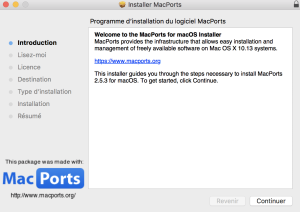
### Etape n°1 : Installation de MacPorts :
Le lien : [https://www.macports.org/install.php](https://www.macports.org/install.php) pour le téléchargement : [macOS High Sierra v10.13](https://distfiles.macports.org/MacPorts/MacPorts-2.5.3-10.13-HighSierra.pkg)
[](https://www.cyber-neurones.org/wp-content/uploads/2018/09/capture-decran-2018-09-26-a-17-03-47.png)
### Etape n°2 : Installation de la partie serveur :
Installation
**# sudo port install munin +server**
Password:
Warning: xcodebuild exists but failed to execute
Warning: Xcode does not appear to be installed; most ports will likely fail to build.
---> Computing dependencies for munin
The following dependencies will be installed:
...
Continue? [Y/n]: **Y**
...
---> Extracting munin
---> Applying patches to munin
---> Configuring munin
---> Building munin
---> Staging munin into destroot
###########################################################
# A startup item has been generated that will cause the
# Munin server to fetch data from all nodes every 5 mins.
# It is disabled by default, please execute the following
# command to enable:
#
# sudo launchctl load -w /Library/LaunchDaemons/org.macports.munin-cron.plist
###########################################################
---> Creating launchd control script 'munin-node'
---> Installing munin @1.4.7_6+server
---> Activating munin @1.4.7_6+server
---> Cleaning munin
---> Updating database of binaries
---> Updating database of C++ stdlib usage
---> Scanning binaries for linking errors
---> No broken files found.
---> No broken ports found.
---> Some of the ports you installed have notes:
libidn has the following notes:
Please be aware that GNU libidn2 is the successor of GNU libidn. It comes
with IDNA 2008
and TR46 implementations and also provides a compatibility layer for GNU
libidn.
munin has the following notes:
To detect supported Munin plugins please use the following command:
*sudo -u munin munin-node-configure --suggest --shell | sudo sh*
A startup item has been generated that will aid in starting munin with
launchd. It is disabled by default. Execute the following command to start
it, and to cause it to launch at startup:
*sudo port load munin*
python27 has the following notes:
To make this the default Python or Python 2 (i.e., the version run by the
'python' or 'python2' commands), run one or both of:
sudo port select --set python python27
sudo port select --set python2 python27
**# sudo port install munin**
---> Fetching distfiles for munin
---> Verifying checksums for munin
---> Extracting munin
---> Applying patches to munin
---> Configuring munin
---> Building munin
---> Staging munin into destroot
---> Creating launchd control script 'munin-node'
---> Installing munin @1.4.7_6
---> Unloading startupitem 'munin-node' for munin
---> Deactivating munin @1.4.7_6+server
---> Cleaning munin
---> Activating munin @1.4.7_6
---> Cleaning munin
---> Scanning binaries for linking errors
---> No broken files found.
---> No broken ports found.
---> Some of the ports you installed have notes:
munin has the following notes:
To detect supported Munin plugins please use the following command:
**sudo -u munin munin-node-configure --suggest --shell** | sudo sh
A startup item has been generated that will aid in starting munin with launchd. It is disabled by default. Execute the following command to start
it, and to cause it to launch at startup:
sudo port load munin
**# sudo -u munin munin-node-configure --suggest --shell
# The following plugins caused errors:
# apache_processes:
# Non-zero exit during autoconf (255)**
# if_:
# Timed out during suggest
# No valid suggestions
# if_err_:
# Timed out during suggest
# No valid suggestions
# mysql_:
# Non-zero exit during autoconf (2)
# slony_lag_:
# Non-zero exit during autoconf (2)
# varnish_:
# Non-zero exit during autoconf (255)
Je supprime le --shell :
**$ sudo -u munin munin-node-configure --suggest **
Plugin | Used | Suggestions
------ | ---- | -----------
amavis | no | no
apache_accesses | no | no [LWP::UserAgent not found]
apache_processes | no | no
apache_volume | no | no [LWP::UserAgent not found]
apc_envunit_ | no | no [no units to monitor]
courier_mta_mailqueue | no | no [spooldir not found]
courier_mta_mailstats | no | no [could not find executable]
courier_mta_mailvolume | no | no [could not find executable]
cupsys_pages | no | no [logfile not found]
**df | yes | yes
df_inode | yes | yes **
exim_mailqueue | no | no [no exiqgrep]
exim_mailstats | no | no ['/usr/sbin/exim -bP log_file_path' returned an error]
fail2ban | no | no [/usr/bin/fail2ban-client not found]
hddtemp_smartctl | no | no [smartctl not found]
http_loadtime | no | no [need time and wget programs]
if_ | no | yes
if_err_ | no | yes
jmx_ | no | no [connection to 127.0.0.1:5400 failed]
**load | yes | yes
lpstat | yes | yes **
munin_stats | yes | no [munin-update was not found at /opt/local/lib/munin/munin-update]
mysql_ | no | no
**netstat | yes | yes**
nginx_request | no | no [LWP::UserAgent not found]
nginx_status | no | no [LWP::UserAgent not found]
ntp_kernel_err | no | no
ntp_kernel_pll_freq | no | no
ntp_kernel_pll_off | no | no
**ntp_offset | yes | yes**
nvidia_ | no | no [no nvclock executable at /usr/bin/nvclock, please configure]
**postfix_mailqueue | yes | yes**
postfix_mailvolume | no | no [logfile '/var/log/syslog' not found]
postgres_bgwriter | no | no [DBD::Pg not found, and cannot do psql yet]
postgres_cache_ | no | no [DBD::Pg not found, and cannot do psql yet]
postgres_checkpoints | no | no [DBD::Pg not found, and cannot do psql yet]
postgres_connections_ | no | no [DBD::Pg not found, and cannot do psql yet]
postgres_connections_db | no | no [DBD::Pg not found, and cannot do psql yet]
postgres_locks_ | no | no [DBD::Pg not found, and cannot do psql yet]
postgres_querylength_ | no | no [DBD::Pg not found, and cannot do psql yet]
postgres_scans_ | no | no [DBD::Pg not found, and cannot do psql yet]
postgres_size_ | no | no [DBD::Pg not found, and cannot do psql yet]
postgres_transactions_ | no | no [DBD::Pg not found, and cannot do psql yet]
postgres_tuples_ | no | no [DBD::Pg not found, and cannot do psql yet]
postgres_users | no | no [DBD::Pg not found, and cannot do psql yet]
postgres_xlog | no | no [DBD::Pg not found, and cannot do psql yet]
**processes | yes | yes**
ps_ | no | no
qmailqstat | no | no
sendmail_mailqueue | no | no
sendmail_mailstats | no | no [no mailstats command]
sendmail_mailtraffic | no | no [no mailstats command]
slapd_ | no | no [Net::LDAP not found]
slapd_bdb_cache_ | no | no [Can't execute db_stat file '/usr/bin/db4.6_stat']
slony_lag_ | no | no
smart_ | no | no [smartmontools not found]
snort_alerts | no | no [/var/snort/snort.stats not readable]
snort_bytes_pkt | no | no [/var/snort/snort.stats not readable]
snort_drop_rate | no | no [/var/snort/snort.stats not readable]
snort_pattern_match | no | no [/var/snort/snort.stats not readable]
snort_pkts | no | no [/var/snort/snort.stats not readable]
snort_traffic | no | no [/var/snort/snort.stats not readable]
squeezebox_ | no | no [no connection on localhost port 9090]
squid_cache | no | no [could not connect: Connection refused]
squid_objectsize | no | no [could not connect: Connection refused]
squid_requests | no | no [could not connect: Connection refused]
squid_traffic | no | no [could not connect: Connection refused]
tomcat_ | no | no
**users | yes | yes **
varnish_ | no | no
vmstat | no | no [could not run "vmstat"]
zimbra_ | no | no [No Text::CSV_XS]
# The following plugins caused errors:
# apache_processes:
# Non-zero exit during autoconf (255)
# if_:
# Timed out during suggest
# No valid suggestions
# if_err_:
# Timed out during suggest
# No valid suggestions
# mysql_:
# Non-zero exit during autoconf (2)
# slony_lag_:
# Non-zero exit during autoconf (2)
# varnish_:
# Non-zero exit during autoconf (255)
**# sudo port install munin**
**Warning: xcodebuild exists but failed to execute
Warning: Xcode does not appear to be installed; most ports will likely fail to build.**
---> Computing dependencies for munin
---> Cleaning munin
---> Scanning binaries for linking errors
---> No broken files found.
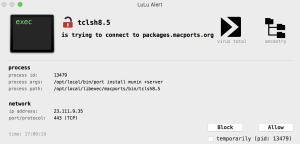
A noter l'avertissement suivant :
[](https://www.cyber-neurones.org/wp-content/uploads/2018/09/capture-decran-2018-09-26-a-17-09-26.png)
Il faut donc comprendre l'erreur avec Apache qui empêche de faire la configuration, c'est surement que je n'ai pas autoconf :
**# brew install autoconf automake libtool**
...
==> Caveats
In order to prevent conflicts with Apple's own libtool we have prepended a "g"
so, you have instead: glibtool and glibtoolize.
==> Summary
? /usr/local/Cellar/libtool/2.4.6_1: 71 files, 3.7MB
==> Caveats
==> autoconf
Emacs Lisp files have been installed to:
/usr/local/share/emacs/site-lisp/autoconf
==> libtool
In order to prevent conflicts with Apple's own libtool we have prepended a "g"
so, you have instead: glibtool and glibtoolize.
**# brew install rrdtool**
Updating Homebrew...
==> Auto-updated Homebrew!
Updated 1 tap (homebrew/core).
==> Updated Formulae
cromwell fn glide kubernetes-helm llnode nifi-registry pre-commit
==> Installing dependencies for rrdtool: gettext, libffi, pcre, glib, libpng, freetype, fontconfig, pixman, cairo, fribidi, graphite2, icu4c, harfbuzz, pango
...
? /usr/local/Cellar/rrdtool/1.7.0_1: 155 files, 3MB
==> Caveats
==> gettext
gettext is keg-only, which means it was not symlinked into /usr/local,
because macOS provides the BSD gettext library & some software gets confused if both are in the library path.
If you need to have gettext first in your PATH run:
echo 'export PATH="/usr/local/opt/gettext/bin:$PATH"' >> ~/.bash_profile
For compilers to find gettext you may need to set:
export LDFLAGS="-L/usr/local/opt/gettext/lib"
export CPPFLAGS="-I/usr/local/opt/gettext/include"
==> libffi
libffi is keg-only, which means it was not symlinked into /usr/local,
because some formulae require a newer version of libffi.
For compilers to find libffi you may need to set:
export LDFLAGS="-L/usr/local/opt/libffi/lib"
For pkg-config to find libffi you may need to set:
export PKG_CONFIG_PATH="/usr/local/opt/libffi/lib/pkgconfig"
==> icu4c
icu4c is keg-only, which means it was not symlinked into /usr/local,
because macOS provides libicucore.dylib (but nothing else).
If you need to have icu4c first in your PATH run:
echo 'export PATH="/usr/local/opt/icu4c/bin:$PATH"' >> ~/.bash_profile
echo 'export PATH="/usr/local/opt/icu4c/sbin:$PATH"' >> ~/.bash_profile
For compilers to find icu4c you may need to set:
export LDFLAGS="-L/usr/local/opt/icu4c/lib"
export CPPFLAGS="-I/usr/local/opt/icu4c/include"
For pkg-config to find icu4c you may need to set:
export PKG_CONFIG_PATH="/usr/local/opt/icu4c/lib/pkgconfig"
**$ sudo -u munin munin-node-configure --suggest --shell**
# The following plugins caused errors:
# apache_processes:
# Non-zero exit during autoconf (255)
# if_:
# Timed out during suggest
# No valid suggestions
# if_err_:
# Timed out during suggest
# No valid suggestions
# mysql_:
# Non-zero exit during autoconf (2)
# slony_lag_:
# Non-zero exit during autoconf (2)
# varnish_:
# Non-zero exit during autoconf (255)
Si je regarde la liste des plugins :
**$ ls -l /opt/local/etc/munin/plugins/***
lrwxr-xr-x 1 root admin 31 26 sep 17:19 /opt/local/etc/munin/plugins/df -> /opt/local/lib/munin/plugins/df
lrwxr-xr-x 1 root admin 37 26 sep 17:19 /opt/local/etc/munin/plugins/df_inode -> /opt/local/lib/munin/plugins/df_inode
lrwxr-xr-x 1 root admin 33 26 sep 17:19 /opt/local/etc/munin/plugins/load -> /opt/local/lib/munin/plugins/load
lrwxr-xr-x 1 root admin 35 26 sep 17:19 /opt/local/etc/munin/plugins/lpstat -> /opt/local/lib/munin/plugins/lpstat
lrwxr-xr-x 1 root admin 40 26 sep 17:19 /opt/local/etc/munin/plugins/munin_stats -> /opt/local/lib/munin/plugins/munin_stats
lrwxr-xr-x 1 root admin 36 26 sep 17:19 /opt/local/etc/munin/plugins/netstat -> /opt/local/lib/munin/plugins/netstat
lrwxr-xr-x 1 root admin 39 26 sep 17:19 /opt/local/etc/munin/plugins/ntp_offset -> /opt/local/lib/munin/plugins/ntp_offset
lrwxr-xr-x 1 root admin 46 26 sep 17:19 /opt/local/etc/munin/plugins/postfix_mailqueue -> /opt/local/lib/munin/plugins/postfix_mailqueue
lrwxr-xr-x 1 root admin 38 26 sep 17:19 /opt/local/etc/munin/plugins/processes -> /opt/local/lib/munin/plugins/processes
lrwxr-xr-x 1 root admin 34 26 sep 17:19 /opt/local/etc/munin/plugins/users -> /opt/local/lib/munin/plugins/users
Je supprime lpstat & ntp_offset:
**$ sudo /opt/local/etc/munin/plugins/lpstat**
Password:
lpstat: No destinations added.
lpstat: No destinations added.
**$ sudo rm /opt/local/etc/munin/plugins/lpstat
$ sudo /opt/local/etc/munin/plugins/ntp_offset**
ntpq: read: Connection refused
delay.value U
offset.value U
jitter.value U
**$ sudo rm /opt/local/etc/munin/plugins/ntp_offset
**
Ensuite il faut lancer Apache :
**# sudo apachectl -k restart**
Il suffit de faire le test suivant : http://127.0.0.1/ .
[](https://www.cyber-neurones.org/wp-content/uploads/2018/09/capture-decran-2018-09-26-a-17-26-13.png)Attention sur mon installation j'ai déjà JAVA, XCODE, APACHE .
**$ java -version**
java version "1.8.0_181"
Java(TM) SE Runtime Environment (build 1.8.0_181-b13)
Java HotSpot(TM) 64-Bit Server VM (build 25.181-b13, mixed mode)
**$ xcode-select -version**
xcode-select version 2349.
**$ apachectl -version**
Server version: Apache/2.4.33 (Unix)
Server built: Apr 3 2018 23:45:11
Pour information les fichiers de configuration sont :
- /opt/local/etc/munin/munin.conf
- /opt/local/etc/munin/munin-node.conf
Les donnes sont dans :
- /opt/local/var/munin
Le WWW pour afficher les données sont dans :
- /opt/local/www/munin/
Les fichiers de logs :
- /opt/local/var/log/munin/munin-node.log
Les binaires (en perl) :
- /opt/local/sbin/
Ensuite il faut donc modifier le fichier de configuration : /etc/apache2/httpd.conf
....
On fait un test manuel sur Munin :
$ **telnet 127.0.0.1 4949**
Trying 127.0.0.1...
Connected to localhost.
Escape character is '^]'.
# munin node at XXXXXX.local
**list**
df df_inode load munin_stats netstat postfix_mailqueue processes users
**fetch netstat**
resets.value 0
failed.value 0
.
Pour faire un test en temps que root (déconseillé) :
**$ sudo mkdir /plugins/
$ sudo ln -s /opt/local/lib/munin/plugins/plugin.sh /plugins/plugin.sh
$ sudo /opt/local/etc/munin/plugins/load **
load.value 1,59
Sinon on a l'erreur :
**$ /opt/local/etc/munin/plugins/df**
/opt/local/etc/munin/plugins/df: line 24: /plugins/plugin.sh: No such file or directory
La méthode plus propre est la suivante :
**$ sudo /opt/local/sbin/munin-run df autoconf --debug**
# Setting up environment
# About to run '/opt/local/etc/munin/plugins/df autoconf'
yes
**$ sudo /opt/local/sbin/munin-run df config --debug**
# Setting up environment
# About to run '/opt/local/etc/munin/plugins/df config'
graph_title Filesystem usage (in %)
graph_args --upper-limit 100 -l 0
graph_vlabel %
graph_scale no
_dev_disk1s1.label /
_dev_disk1s4.label /private/var/vm
**$ sudo /opt/local/sbin/munin-run df --debug**
# Setting up environment
# About to run '/opt/local/etc/munin/plugins/df'
_dev_disk1s1.value 92
_dev_disk1s4.value 6
**A noter que pour l'instant ce n'est pas stable !!! J'ai du ma à comprendre.**
Mes fichiers :
**$ sudo cat /Library/LaunchDaemons/org.macports.munin-node.plist**
Labelorg.macports.munin-node
ProgramArguments
/opt/local/bin/daemondo
--label=munin-node
--start-cmd
/opt/local/etc/LaunchDaemons/org.macports.munin-node/munin-node.wrapper
start
;
--stop-cmd
/opt/local/etc/LaunchDaemons/org.macports.munin-node/munin-node.wrapper
stop
;
--restart-cmd
/opt/local/etc/LaunchDaemons/org.macports.munin-node/munin-node.wrapper
restart
;
--pid=none
Disabled
KeepAlive
**$ sudo cat /Library/LaunchDaemons/org.macports.munin-cron.plist**
Label
org.macports.munin-cron
UserName
munin
ProgramArguments
/opt/local/sbin/munin-run
LowPriorityIO
Nice
1
StartInterval
300